Doodle Master - Glow Art
- 4.7
- Rating
- 10.00M
- Installs
- Free
- Price
 Analysis by App-foxy
I approached Doodle Master - Glow Art as a quick creative break rather than a serious drawing studio, and that distinction explains most of my experience with it. The app turns doodling into a simple glow-based activity: you draw with bright lines, experiment with color and movement, and enjoy the immediate visual result without needing traditional art skills. It is easy to pick up, visually playful, and especially comfortable when I want something relaxing that does not demand a long tutorial.
My overall view is positive, but with a clear qualification: this is best understood as a casual glow doodle app, not a replacement for a full illustration tool. Its appeal comes from low pressure and instant feedback. You can open it for a few minutes, make something colorful, and stop without feeling that you have abandoned a complicated project. If you expect layers, precise editing, professional export controls, or a deep drawing workflow, you should look elsewhere.
What makes the drawing experience work
The first strength is how quickly the app gets out of the way. In many art applications, the opening minutes are spent choosing a canvas, learning panels, adjusting brushes, and trying to understand what each control does. Here, the central idea is much more direct: create glowing marks and see them appear as part of a bright doodle. That simplicity makes the app approachable for children, casual users, and anyone who feels intimidated by conventional drawing software.
You May Also Like

 Pandora - Music & Podcasts
Pandora’s Music Is Easy to Start, but Harder to Recover
Pandora’s strength is its low-effort path from a seed to a station. Its weak spot is how much confidence it asks you to place in connection, setup, and quiet recovery.

 8 Ball Pool
 Is Built on Rivalries, Rematches, and Routine
A close look at the rivalries, rematches, shared routines, and unanswered safety questions that turn a quick pool match into a persistent mobile community.

 Samsung Music
’s Quiet Strength Is Playing What You Already Own
Its reach comes less from spectacle than from dependable access to a personal library. That simplicity is both the app’s strongest retention engine and its ceiling.

 AccuWeather: Weather Radar
AccuWeather Review: A Quick, Clear Forecast for Everyday Decisions
For everyday plans, the best forecast is the one you can understand quickly. AccuWeather makes rain timing, radar, and local conditions easy to act on, with a few trade-offs.

 Hill Climb Racing
Why Hill Climb Racing Still Turns Crashes Into One More Run
A tiny car, a bumpy hill and one more upgrade: Hill Climb Racing keeps resurfacing because its simple chaos makes every near-miss feel personal.

 AliExpress - Shopping App
AliExpress Makes Global Shopping Feel Personal, but Shoppers Bear the Risk
AliExpress turns a global marketplace into a pocket-sized discovery engine. Its reach is useful, its shopping loop compelling, and its trade-offs easy to miss.
More From Our News Desk
View All News


I also like the way the glow effect changes the emotional tone of a rough sketch. A crooked line does not look like a failed attempt in the same way it might on a plain white canvas. Light, color, and contrast give even basic shapes a more finished appearance. This is an important part of the app's value: it rewards experimentation instead of demanding accuracy. You can draw stars, spirals, lettering, borders, faces, or abstract patterns and still get an attractive result quickly.
That makes it useful in small everyday situations. I can imagine using it while waiting for an appointment, relaxing before bed, or giving a child a quiet activity during a short break. It also works as a low-stakes way to explore color combinations. Rather than planning a complete illustration, I can test how a bright line looks beside another one, fill a screen with repeated shapes, and move on when the idea has run its course.
A less obvious advantage is that the app lowers the cost of starting. With a conventional drawing app, I often hesitate because I feel I should make something worth saving. The glow style removes some of that pressure. Since the visual treatment does part of the presentation work, the activity feels closer to digital doodling than to a formal art session. That is a meaningful difference for beginners who want to create but do not yet have a personal drawing style.
The app belongs to the Art & Design category, but I would place it at the playful end of that category. It is closer to a creative toy or a visual relaxation tool than to a production workspace. That is not a criticism by itself. In fact, the narrow focus is why the experience feels accessible. The trade-off is that the same focus may become limiting once you want more control over the final image.
A good fit for short creative sessions
One practical way to use it is to give yourself a small prompt instead of trying to create a finished picture. Draw a night sky using only repeated marks, make a glowing pattern around a word, or fill the screen with one shape in several variations. These exercises make the app feel more purposeful and help prevent the experience from turning into random tapping. I found that a simple prompt also makes it easier to notice which colors and line movements I actually enjoy.
Another useful approach is to treat the screen as a temporary sketchbook. I can use the app to explore an idea for a poster, a greeting card, or a decorative pattern before recreating it in a more precise tool. The glow effect will not provide the same technical reference as a professional sketching application, but it can help with visual rhythm and composition. Repeating a shape, leaving empty space, and balancing brighter areas are all easier to think about when the result appears immediately.
For parents, the Everyone content rating makes the app broadly approachable, though I would still guide younger children at first. The creative task is simple enough to understand, but the most enjoyable results may come from trying different controls rather than drawing one picture from start to finish. A short demonstration can show a child that the point is experimentation, not perfect coloring inside lines.
The app is also a reasonable choice for someone who wants a screen activity with a creative outcome but does not want a competitive game. There is no need to compare scores or master a complicated system. The satisfaction comes from making a visual mark and watching the canvas change. That makes it calmer than many entertainment apps, although the bright effects may not suit people who prefer quiet, minimal interfaces.
Where it differs from ordinary drawing apps
Compared with a standard sketching app, Doodle Master - Glow Art is more immediate but less flexible. A normal drawing tool usually gives you a broad range of brushes and editing decisions, while this app's identity is built around luminous doodling. If your goal is handwriting practice, detailed portrait work, technical diagrams, or layered digital painting, a general-purpose art app will serve you better.
Compared with coloring apps, the experience is more active. Instead of selecting enclosed areas and filling them, you create the marks yourself. That gives you more freedom to make abstract designs, but it also means the result depends on your willingness to draw. Someone looking for a very structured coloring-book experience may find this less guided than expected.
It also differs from games that use drawing as one part of a larger challenge. Here, the appeal is not solving a puzzle or progressing through a story. The drawing itself is the activity. I consider that a strength when I want a relaxed session, but it can feel thin if I need goals, unlocks, missions, or a strong sense of advancement.
This comparison points to the app's clearest thesis: it succeeds by making visual creation feel effortless, not by offering the largest toolset. I would choose it over a complex art app for a five-minute creative pause. I would choose the complex app when the image needs careful revision, consistent proportions, or a professional finish.
The limitation that matters most
The main weakness is the narrowness that makes the app approachable. Once the novelty of glowing lines settles, some users may want more depth. Casual doodling can remain enjoyable, but without a broader creative workflow, the experience may not hold attention for people who want to develop a detailed project over several sessions.
That limitation matters especially if you are comparing it with established drawing software. A serious artist will likely miss the kind of control needed for clean line work, detailed shading, or an organized illustration process. Even a hobbyist who begins with simple doodles may eventually want tools that let them refine a shape instead of accepting the spontaneous look produced by the glow style.
There is also a difference between visual polish and artistic control. The bright effect can make a quick drawing look lively, but it does not automatically solve composition. A crowded screen can still look crowded, and a color combination can still feel harsh. My advice is to use empty space deliberately and avoid changing colors too often in one small area. A limited palette usually makes the result easier to read.
Another point to consider is the free-to-use model. The app is free, which makes trying it low risk, but in-app purchases are listed at $5.99 per item. I would not spend money immediately. I would first decide whether the core doodling loop remains enjoyable after the first few sessions and whether any paid content would genuinely improve the way I use it. For a casual tool, optional purchases should feel like a convenience rather than a requirement.
That price point also affects who should skip the app. If you already own a capable drawing application and only want more brushes, layers, or export control, this may not add enough value. You might enjoy the glow aesthetic, but you could end up paying for a specialized experience when your existing software already covers your creative needs.
Practical ways to get better results
I found that starting with large, simple forms works better than attempting tiny details immediately. A broad spiral, a bold outline, or a repeated geometric pattern gives the glow effect room to breathe. After that, smaller accents can be added where the composition feels empty. Beginning with details tends to create a busy image before there is any clear structure.
It also helps to pause between strokes. Because the app encourages quick doodling, it is easy to keep adding marks simply because the screen responds attractively. Taking a moment to inspect the balance of the image can prevent the final result from becoming a bright tangle. This is one of the few habits that makes a noticeable difference without requiring advanced artistic skill.
For lettering, I would use short words and generous spacing. Glowing lines can make letters look expressive, but tightly packed writing may become difficult to read. A short message or a single initial is more likely to look intentional than a long sentence squeezed into one design. This makes the app suitable for experimenting with decorative lettering, though not necessarily for preparing polished typography.
For children or beginners, a useful workflow is to choose one subject and repeat it three times with different arrangements. For example, draw the same flower as a small icon, a large central shape, and a border pattern. This turns free-form play into a basic lesson in scale and placement without making the activity feel like homework.
I would also save or share a result only after looking at it at normal size rather than zooming in mentally on individual marks. Glow effects can make a design feel impressive while you are focused on one corner, but the overall image may need more space or fewer elements. Reviewing the whole composition is a small step, yet it helps separate a pleasant experiment from a design you will actually want to keep.
Who should install it
I recommend this app to people who want a friendly introduction to digital doodling. It is especially suitable if you enjoy bright visual effects, like making abstract patterns, or need a relaxing activity that can be started and stopped quickly. The low-pressure format is also helpful for anyone who says, “I am not artistic,” but still wants to make something of their own.
It can be a good choice for families looking for an accessible creative activity, provided expectations remain realistic. The app is not trying to teach a complete drawing curriculum. It gives users a colorful space to explore marks, shapes, and visual ideas. That can be valuable on its own, particularly for a child who is more interested in experimenting than following a detailed lesson.
I would be more cautious recommending it to illustrators, designers, students building a serious portfolio, or users who need dependable editing precision. Those people will probably be happier with software designed around layers, detailed brush control, and repeatable revisions. The glow style may still be useful for brainstorming, but it should not be treated as the main production environment.
It is also not the best fit for someone who needs a strong game structure. The store presents it as a doodle-focused experience, and that is how I would approach it. If you want levels, objectives, character progression, or a competitive challenge, a drawing game with a more formal reward system will likely keep you engaged longer.
What the current app details suggest
Happy coloring is the developer behind the app, which has been available since May 31, 2019. The current version is 2.2.36, and it runs on Android 5.0 or later. Those details make it accessible to people using older Android devices, although the actual comfort of drawing will still depend on screen size and responsiveness. A larger display is preferable because it gives your strokes more room and makes patterns easier to judge.
The app is free to install and carries an Everyone age rating. Its audience reach is substantial, with over 10 million installs, while its average rating is 4.7 from around 95 thousand ratings. I see those figures as evidence that the basic concept connects with a broad group of casual users, not as a guarantee that every person will enjoy its limited focus.
There are also around 5.3 thousand written reviews, which suggests that many users have taken the time to comment on their experience. I would still judge the app by your own expectations. A person seeking relaxation may rate the glow effect highly, while someone expecting a complete art workstation may find the same simplicity restrictive.
My final recommendation
After spending time with it, I see Doodle Master - Glow Art as a focused, approachable creative toy that does one thing well: it makes casual glowing doodles feel rewarding almost immediately. Its strongest quality is not technical depth but the way it removes hesitation. I can open it without a plan, make a few marks, and finish with something colorful instead of facing a blank canvas for too long.
The meaningful weakness is equally clear. The app's specialized style will not satisfy users who need serious drawing controls or a long-term illustration workflow. Its free entry point is appealing, but I would test the everyday experience before considering the $5.99 in-app items. If the glow aesthetic is exactly what you want, those purchases may be worth considering; if you simply want a general art tool, another option is likely a better investment.
My recommendation is simple: choose it for quick, cheerful digital doodling, not for professional artwork. For a child, a beginner, or a tired adult looking for a few calm minutes of creative play, it is easy to recommend. For an experienced artist or anyone who needs precision, organization, and substantial editing power, I would skip it and use a fuller drawing application instead.
FAQs for Doodle Master - Glow Art
01What is Doodle Master - Glow Art?
Doodle Master - Glow Art is a creative drawing app designed for users to create stunning glow art. With various brushes and colors, it allows artists of all levels to craft vibrant and luminous designs. It's perfect for both casual doodling and intricate art projects, providing a unique drawing experience.
02Is Doodle Master - Glow Art free to use?
The app is free to download and offers a range of basic features without charge. However, it includes in-app purchases for advanced tools and additional content, such as premium brushes and color palettes. These optional purchases enhance the app experience but are not necessary for basic use.
03What are the main features of Doodle Master - Glow Art?
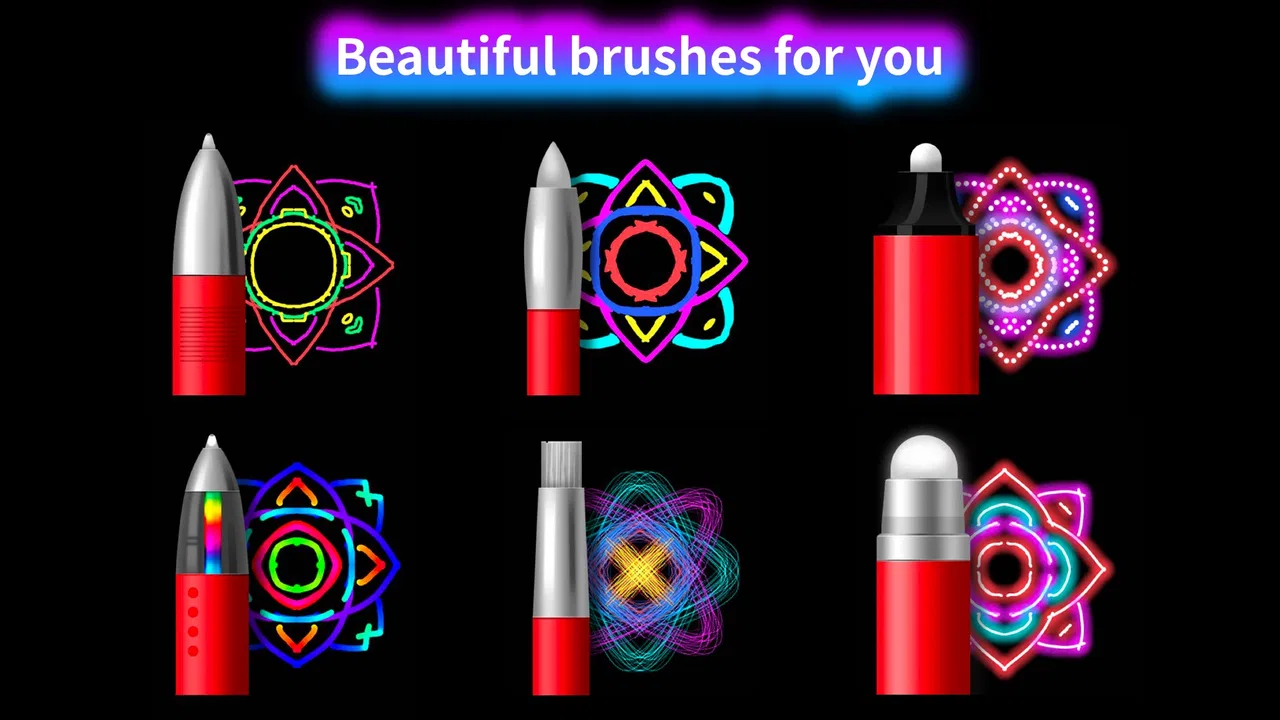
The app boasts a variety of features, including multiple brush types, adjustable glow effects, and a wide color palette. Users can save and share their creations easily. It also includes a user-friendly interface, making it accessible for beginners while offering depth for more experienced artists.
04Is Doodle Master - Glow Art suitable for children?
Yes, Doodle Master - Glow Art is suitable for children. Its simple interface and fun, glowing effects make it an engaging tool for kids to explore their creativity. Parents should note any in-app purchases, which can be disabled to prevent accidental purchases by young users.
05Can I share my creations from Doodle Master - Glow Art?
Absolutely! The app allows users to easily save their artwork to their device. You can share your glowing masterpieces on social media platforms or via messaging apps directly from the app, making it simple to showcase your creativity with friends and family.
Pros
- Intuitive interface for easy use.
- Wide variety of brushes and colors.
- Supports high-resolution exports.
- Responsive touch controls.
- Regular updates with new features.
Cons
- Occasional ads disrupt workflow.
- Limited free features available.
- Requires internet for some functions.
- No layer support for complex designs.
- Some brushes need in-app purchases.

Doodle Master - Glow Art
Gallery